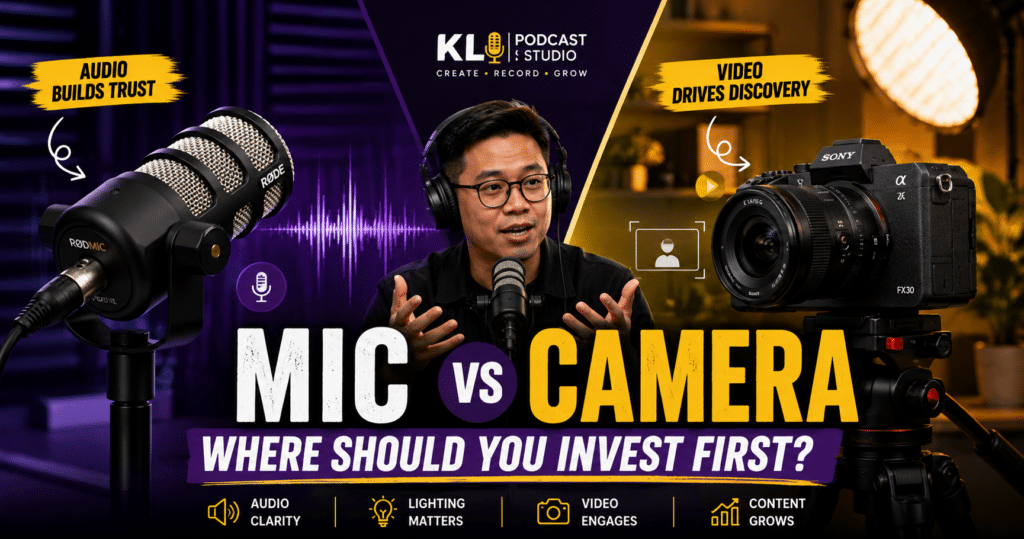
Microphones vs cameras for podcasting is one of the most common questions for new podcasters, creators, business owners and marketing teams.
When you are preparing to start a podcast, it is tempting to spend most of the budget on camera bodies, lenses, 4K recording and a beautiful visual setup. After all, video podcasts are everywhere now.
But here is the problem: a podcast can survive average video quality, especially if the content is strong. It is much harder for a podcast to survive bad audio.
If people cannot hear you clearly, they will not stay long enough to care about your message, your guest, your camera angle or your brand.
That does not mean cameras are not important. Video is extremely useful for YouTube, TikTok, Reels, Shorts, LinkedIn and content repurposing. But if your budget is limited, your first priority should be clear audio, a suitable microphone, and a recording environment that does not destroy your sound.
In this article, we will break down where you should invest first for your podcast: microphones, cameras, lighting, studio setup, or a balanced workflow.
Still deciding what equipment you need?
Read this guide too: The Minimum Equipment You Need To Start A Podcast
Quick Answer: Should You Invest in Microphones or Cameras First?
If you are starting a podcast with limited budget, invest in audio first. A good microphone, proper mic technique, clean recording levels and a suitable room will make a bigger difference than an expensive camera in a bad setup.
After audio is stable, invest in lighting before upgrading your camera. Good lighting can make a basic camera look professional, while bad lighting can make an expensive camera look average.
The Simple Rule: Audio First, Video Second, Lighting Always
The best podcast setup is not about buying the most expensive equipment. It is about building the right order of priority.
For most podcasters, this is the order that makes the most sense:
- Audio quality: microphone, room, gain level, monitoring and clean recording.
- Lighting: key light, fill light and background separation.
- Camera: clear framing, stable shot, enough resolution and reliable recording.
- Workflow: file management, backup, editing and repurposing.
Many beginners do the opposite. They buy a camera first, then realize their room echoes, their microphone sounds thin, their lighting is too dark, and editing becomes harder than expected.
A better setup starts with the basics that affect the final viewer and listener experience the most.
Microphones vs Cameras: Quick Comparison
| Aspect | Microphone / Audio Setup | Camera / Visual Setup |
|---|---|---|
| Main Role | Clarity, trust, retention and listening comfort | Discovery, visual branding, social clips and YouTube presence |
| Biggest Risk | Bad audio makes the episode hard to consume | Average video can still work if audio and content are strong |
| Best Investment First | Good dynamic mic, room control, monitoring and clean levels | Lighting, stable framing and reliable camera before expensive upgrades |
| Platform Strength | Spotify, Apple Podcasts, audio clips, long-form listening | YouTube, TikTok, Reels, Shorts, LinkedIn video |
| Common Mistake | Buying a good mic but recording in a noisy or echoey room | Buying an expensive camera but using poor lighting |
| Priority Level | Essential from day one | Important for video podcasts, but should not come before usable audio |
Why Audio Quality Matters More Than Beginners Think
Podcasting is built on voice.
Even if you record a video podcast, people are still listening to your ideas, questions, stories and tone of voice. If the audio is echoey, distorted, too soft, too sharp or full of background noise, the audience has to work harder to understand you.
That extra effort creates fatigue. After a few minutes, people may stop listening even if the topic is interesting.
Bad Audio Can Cause:
- Listener fatigue.
- Lower perceived professionalism.
- Difficulty understanding the conversation.
- More editing work during post-production.
- Less trust in the host, brand or production quality.
Good audio does not need to sound overly polished or radio-perfect. But it must be clear, comfortable and consistent.
Want to understand why sound quality matters?
Read this article: The Importance of Audio Quality in Podcasting
What Microphone Should You Invest In?
For most podcast setups, especially in home studios, offices, and untreated rooms, a dynamic microphone is usually the safer choice.
Dynamic microphones are less sensitive to room noise compared to many condenser microphones. They are useful when you want to capture the speaker’s voice while reducing background echo, air-conditioning sound, traffic noise or room reflections.
Common Podcast Microphone Options
- RØDE PodMic: A popular XLR dynamic broadcast microphone for podcasting and content creation.
- Shure SM7dB: A premium dynamic vocal microphone with a built-in preamp, useful for podcast and vocal recording setups.
- Shure MV7+ / MV7i: Suitable for creators who want a more flexible USB/XLR-style podcast workflow.
- USB microphones: Good for solo beginners who want a simple plug-and-play setup.
For more details, you can read the official RØDE PodMic page and the official Shure SM7dB product page.
That said, the microphone alone is not enough. A good microphone placed wrongly in a bad room can still sound bad.
Studio Note
Our Own Studio Journey: Audio First, Then Better Video and Lighting
At KL Podcast Studio, we also learned this from experience.
When we first started our studio in 2022, one of our earliest investments was in reliable podcast microphones. We began with 4 units of RØDE PodMic because we needed microphones that were trusted, clear and suitable for podcast conversations.
As the studio grew and more clients recorded with us, we continued using and expanding that setup. Today, we have 12 units of RØDE PodMic across our studio operations because they remain practical, durable and dependable for many podcast recording needs.
Later, when we developed our flagship premium studio, Studio A in Petaling Utama, we upgraded the microphone experience with Shure SM7dB and Shure MV7+ for a more premium, broadcast-style sound and feel.
This became part of the reason Studio A is known as our SHURE Experience Studio, following our partnership with Shure in 2025.
But the upgrade did not stop at microphones. When we launched our Petaling Utama studio in 2024, we also partnered with RØDE and Nanlite. From there, we upgraded our studio lighting with Nanlite lights across our studios, because video quality is not only about cameras — it is also about lighting.
For cameras, most of our studios use Sony ZV-E10 cameras, while Studio A uses Sony FX30 cinema cameras to support a stronger flagship video podcast experience.
The lesson is simple: we did not build quality by choosing only microphones or only cameras. We built it in stages. First, we focused on clear audio. Then, we improved lighting, camera quality, studio workflow and the overall recording experience.
That is why for most podcasters, especially beginners and businesses, the better question is not “mic or camera?”. The better question is: what upgrade will improve the audience experience the most right now?
Your Room Is Part of Your Audio Setup
Many people think audio quality only comes from the microphone. In reality, your room plays a huge role.
Hard walls, glass, tiles, empty rooms and bare ceilings can create echo and reflections. That echo will enter your microphone and make your podcast sound hollow or messy.
Simple Ways to Improve Your Recording Room
- Record in the quietest room available.
- Avoid empty rooms with hard surfaces.
- Use curtains, carpets, bookshelves, sofas or acoustic panels to reduce reflections.
- Turn off noisy fans, air-conditioning or nearby appliances where possible.
- Keep the microphone close enough to your mouth.
- Use headphones to monitor problems before recording the full episode.
Before upgrading to a more expensive microphone, fix your room and mic technique first.
Mic Technique: The Cheapest Audio Upgrade
Mic technique is one of the most overlooked parts of podcasting.
You can improve your sound immediately by learning how to speak into the microphone properly.
Basic Podcast Mic Technique
- Keep your mouth around 2 to 4 fingers away from the microphone.
- Speak slightly off-axis to reduce harsh “P” and “B” plosive sounds.
- Do not move too far away while speaking.
- Use a pop filter or windscreen if needed.
- Set your gain so your voice is strong but not clipping.
- Use headphones to catch noise, distortion or level problems early.
For recording levels, a safe beginner target is to keep normal speech comfortably below clipping. Avoid hitting the red zone. A clean recording is easier to edit than a distorted recording.
Need more practical recording tips?
Read this guide: The Ultimate Podcast Recording Hacks and Best Practices
So, Are Cameras Not Important?
Cameras are definitely important, especially if your podcast strategy includes YouTube, TikTok, Instagram Reels, YouTube Shorts or LinkedIn video.
Video helps people discover your podcast. It also helps your audience see facial expressions, reactions, body language and the chemistry between host and guest.
YouTube has announced that there are more than 1 billion monthly active viewers of podcast content on YouTube, which shows how important video podcasting has become for modern podcast discovery.
Spotify also supports video podcast uploads through Spotify for Creators, and states that video episodes uploaded to Spotify can be delivered as video on Spotify while audio is delivered to other listening platforms via RSS.
Video Helps With:
- YouTube discovery.
- TikTok, Reels and Shorts clips.
- Personal branding.
- Business trust and credibility.
- Visual reactions and guest chemistry.
- Better thumbnails and content repurposing.
So the answer is not “ignore cameras”. The answer is: do not overspend on cameras before your audio and lighting are ready.
Still wondering why video podcast matters?
Read this article: Kenapa Video Podcast Bukan Lagi Pilihan, Tapi Keperluan
Lighting Before Camera Upgrades
If your video looks flat, noisy or unprofessional, the problem may not be your camera. It may be your lighting.
Good lighting can make a basic camera look much better. Poor lighting can make an expensive camera look disappointing.
Before buying a new camera body, consider improving your lighting setup first.
Basic Podcast Lighting Setup
- Key Light: The main light on the speaker’s face, usually softened with a softbox.
- Fill Light: A softer light to reduce harsh shadows.
- Back Light or Rim Light: A light behind the subject to separate them from the background.
- Background Light: Optional light to add depth and mood to the studio set.
For video podcasts, lighting affects skin tone, contrast, mood, depth and how professional the final content feels.
What Camera Should You Invest In?
You do not always need the most expensive camera to start a video podcast.
For many podcast setups, a reliable mirrorless camera, camcorder or even a modern smartphone can work if the lighting, framing and audio are handled well.
Camera Features That Matter for Podcasting
- Clean HDMI output if you are using a video switcher or external recorder.
- Reliable autofocus or manual focus control.
- No overheating issue during long recording sessions.
- Continuous power option for long episodes.
- Good low-light performance, but not as a replacement for lighting.
- Flexible lens options for wide and close-up shots.
For podcasts, the best camera is not always the most cinematic camera. It is the camera that can record reliably for the full session with stable framing and consistent image quality.
Not sure whether to record in 1080p or 4K?
Read this comparison: 1080p vs 4K Podcast Recording: Which Is Better?
Recommended Investment Priority by Budget
Your best investment depends on your budget and goals. Here is a simple guide.
| Budget Stage | Priority | What to Buy or Improve First |
|---|---|---|
| Beginner / Low Budget | Audio clarity | USB mic or entry-level dynamic mic, headphones, quiet room, basic lighting |
| Creator / Growing Podcast | Audio + lighting + simple video | Dynamic XLR mic, audio interface or mixer, soft key light, one or two cameras |
| Business / Brand Podcast | Professional audio and video consistency | Multi-mic setup, treated room, proper lighting, multi-camera workflow, operator support |
| Corporate / Studio Build | Workflow and reliability | Acoustic treatment, broadcast mics, video switcher, cameras, lighting grid, file backup system |
The goal is not to buy everything at once. The goal is to remove the biggest quality bottleneck first.
Home Studio vs Professional Studio
If you are building your own setup, you will need to think about microphones, cameras, lighting, acoustic treatment, cables, stands, recording devices, editing software and file management.
That can be a good long-term investment if you record very often and have a suitable room.
But if you are just starting, or if your podcast is for business, guests, brand content or social media campaigns, using a professional podcast studio can be more practical.
| Option | Best For | Main Benefit |
|---|---|---|
| Home Studio | Solo practice, frequent recording, low-stakes content | Flexibility and long-term control |
| Professional Podcast Studio | Guest interviews, business podcasts, brand content, multi-camera video | Cleaner setup, better guest experience and less technical stress |
| Hybrid Approach | Creators who want both flexibility and quality | Record casual content at home and important episodes in studio |
Trying to decide between home setup and studio recording?
Read this article: Home Studio vs Professional Podcast Studio: Which Delivers Better Quality?
Pre-Recording Checklist: Audio and Video
Before every recording session, run through a quick checklist. This can prevent expensive mistakes and save hours during editing.
Audio Checklist
- Is every microphone connected and tested?
- Are all speakers close enough to the microphones?
- Are voices strong but not clipping?
- Is there any air-conditioning, fan, traffic or electrical noise?
- Are headphones available for monitoring?
- Did you record a 10-second test and listen back?
Video Checklist
- Are cameras framed properly?
- Are faces well-lit?
- Is focus locked or reliable?
- Is the background clean and not distracting?
- Are cameras powered for the full session?
- Are memory cards, storage or recording devices ready?
A simple test before recording is much better than discovering problems after the guest has left.
Common Mistakes When Choosing Podcast Gear
Many podcasters overspend because they buy gear based on hype instead of workflow.
Avoid These Mistakes:
- Buying an expensive camera before fixing audio.
- Using a condenser microphone in a noisy or echoey room.
- Ignoring lighting and blaming the camera.
- Recording without headphones or monitoring.
- Buying gear that your team does not know how to use.
- Not checking power, storage and backup before recording.
- Choosing looks over reliability.
Podcast gear should make production easier, not more stressful.
So, Where Should You Invest First?
If your budget is limited, start here:
- Microphone and audio chain: Make sure your voice sounds clear.
- Room and acoustic control: Reduce echo and noise.
- Headphones and monitoring: Catch problems early.
- Lighting: Improve video quality before upgrading cameras.
- Camera: Choose reliable cameras that match your workflow.
- Editing and repurposing: Make sure your content can become clips, posts and episodes.
For most podcasters, microphones and audio should come first. Cameras become more important once you are ready to use video strategically.
FAQ: Microphones vs Cameras for Podcasting
1. Should I buy a microphone or camera first for my podcast?
Buy or improve your microphone and audio setup first. Clear audio is essential for podcasting, while video quality can be improved gradually with better lighting, framing and camera upgrades.
2. Can I start a podcast with just a phone camera?
Yes, especially if your lighting and audio are good. A modern phone camera can look decent, but the built-in microphone usually will not give the best podcast sound. Use an external microphone when possible.
3. What type of microphone is best for podcasting?
For many podcast setups, a dynamic microphone is a safe choice because it is less sensitive to room noise than many condenser microphones. However, mic technique and room control are still important.
4. Is 4K video necessary for podcasting?
Not always. 1080p is often enough for many podcast episodes and social clips. 4K can be useful for cropping, reframing and premium production, but it also requires more storage and editing power.
5. Should businesses build an in-house podcast setup?
It depends on recording frequency and internal capability. If your business records often and has a trained team, an in-house setup can make sense. If you want professional quality without buying and managing gear, a podcast studio may be more practical.
6. Can KL Podcast Studio help with both microphones and cameras?
Yes. KL Podcast Studio provides professional podcast setups with microphones, cameras, lighting and production support, so creators and brands do not have to choose between audio quality and video quality.
Conclusion: Do Not Choose Gear, Choose the Right Workflow
The microphones vs cameras debate is really a workflow question.
If your podcast is audio-only, audio is everything. If your podcast is video-first, audio is still the foundation, but cameras, lighting and framing become important for discovery and social media clips.
For most creators and businesses, the best order is simple: audio first, lighting second, camera third, workflow always.
Do not buy gear only because it looks impressive. Invest in the tools and environment that make your podcast easier to listen to, easier to watch and easier to repurpose.
That is how you build a podcast that does not just look good on the first day, but continues to work as a long-term content asset.
Ready to Record With Professional Audio and Video?
Record your podcast at KL Podcast Studio and get a professional setup with microphones, cameras, lighting and production support, so you can focus on the conversation while we handle the technical workflow.